Skip to content

The AI drafter for MEP engineers and designers.

AutoMEP edits AutoCAD and Revit drawings for you. Upload a DWG or RVT, describe the change in your own words, and download a native file you can open and check.

See a real drawing, before and after

AutoMEP Agent

Hi, I'm the AutoMEP Agent. Let's start with your drawing. Drop in an AutoCAD or Revit file and I'll take it from there.

Your drawing stays in this browser until you create an account.
One request, before and after

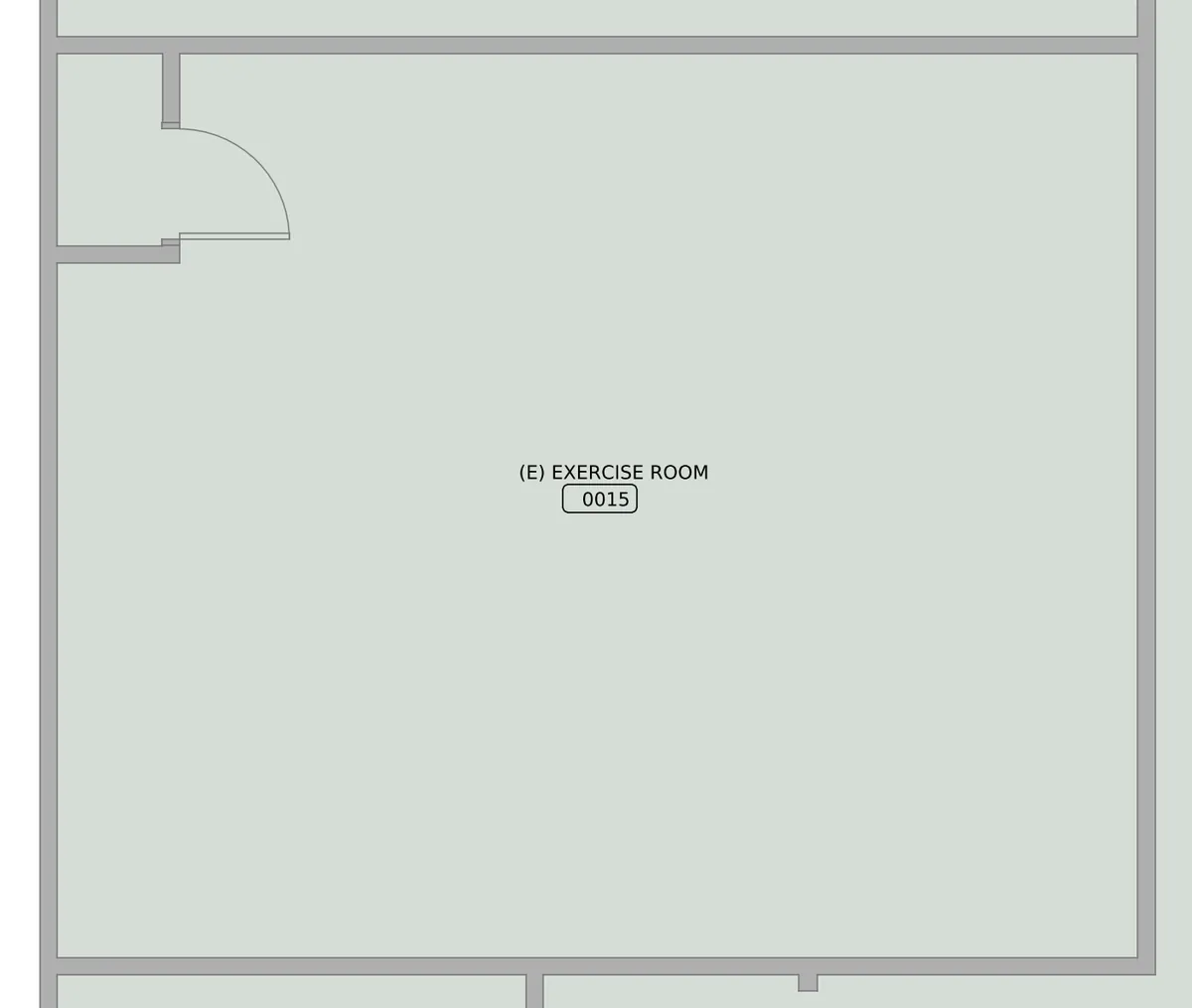
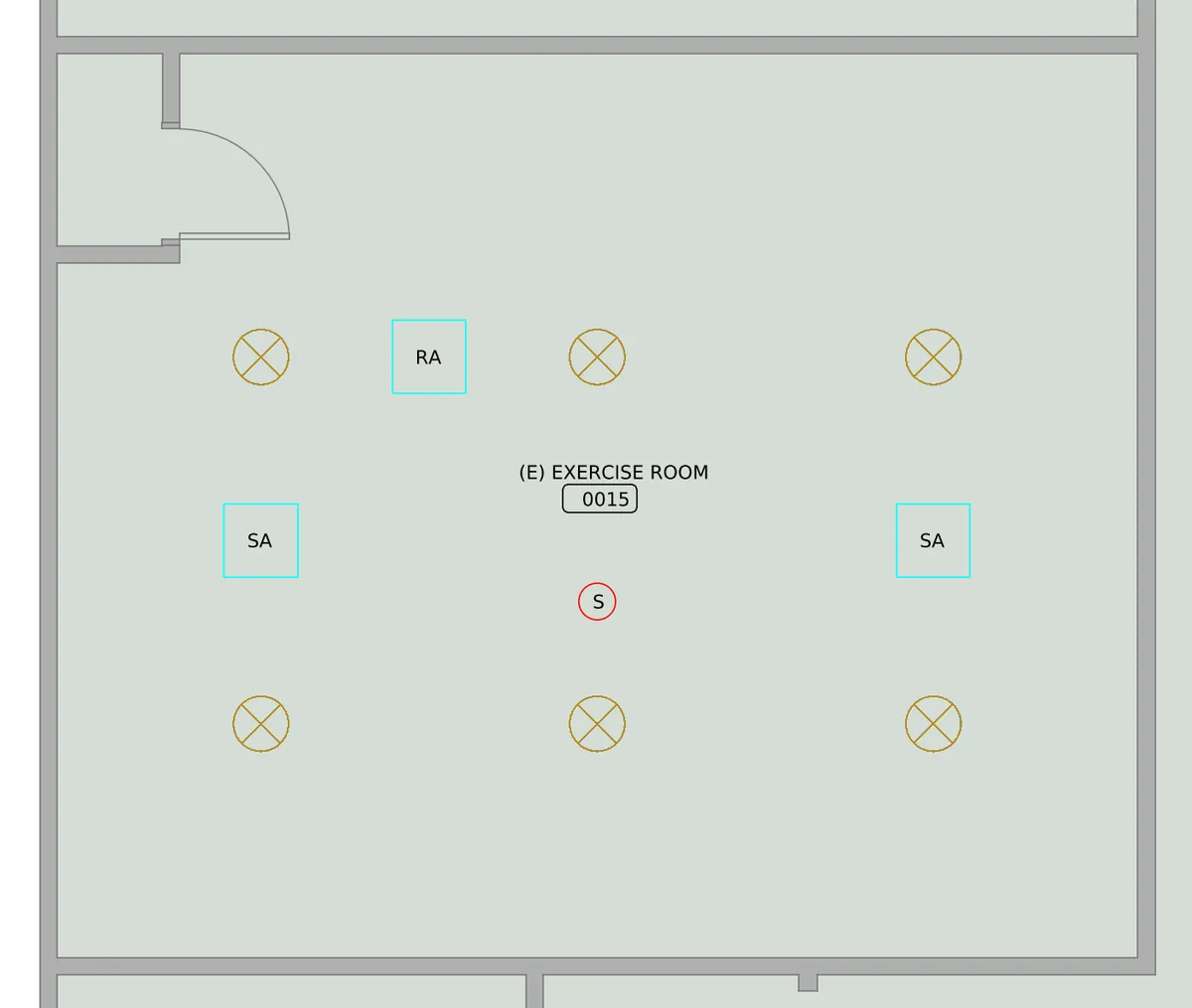
Drag the handle across a floor plan AutoMEP edited. Both sides show the same view at the same scale, so anything that appears is what the request added.

An empty exercise room on an AutoCAD floor plan, before the request
The same exercise room after the request, with six ceiling lights in a grid, two supply diffusers, a return grille and a smoke detector
The request
“Lay out the ceiling devices in the Exercise Room and the Stretching Studio on this floor plan. In the Exercise Room, add six ceiling light fixtures in an even grid of two rows of three. In the Stretching Studio, add four ceiling light fixtures in an even grid of two rows of two. In each of those two rooms, add two ceiling supply air diffusers marked SA and one return air grille marked RA, set in the open ceiling between the light fixtures. Add one ceiling smoke detector marked S in each room, below the room name tag and at least three feet from the nearest edge of every diffuser and grille. Every device must sit inside its own room, clear of the walls, the doors and door swings, the room name tags and every other device. Do not add anything to any other room. Add a legend below the plan for each new symbol.”

AutoMEP laid out both ceilings: an even grid of lights, supply diffusers and a return grille set between them, and a smoke detector kept well clear of the air outlets, with a legend below the plan.

See more examples and what to check

From your AutoCAD or Revit file to a finished MEP drawing, without opening CAD.

Drawings change all the time. A client moves a wall, or a new tenant wants more outlets. Describe the change in your own words and AutoMEP drafts it into your DWG or RVT, ready for your engineer or drafter to check.

house-plan.dwg
Drop your drawing here, or browseA DWG or RVT file

MEP drawing symbols, in everyday words.

Mechanical, electrical and plumbing drawings, MEP for short, use a shorthand of small symbols. You don't have to learn it. Ask for an outlet or an air vent and AutoMEP draws the symbol a drafter would use.

  • Wall outletOn a drawing: Duplex receptacle
  • Light switchOn a drawing: Single-pole switch
  • Ceiling lightOn a drawing: Ceiling fixture
  • Smoke alarmOn a drawing: Smoke detector
  • Breaker panelOn a drawing: Panelboard
  • Air ventOn a drawing: Supply diffuser
  • Air returnOn a drawing: Return grille
  • Bathroom fanOn a drawing: Exhaust fan
  • ToiletOn a drawing: Water closet
  • Bathroom sinkOn a drawing: Lavatory

Heating, power and water: HVAC, electrical and plumbing for any kind of building.

Heating and cooling

Mechanical (HVAC)

HVAC ductwork, air vents, fans and the equipment that moves air around a building. AutoMEP can route a duct, place vents room by room and label each run with its size and airflow.

Power and lighting

Electrical

Outlets, switches, light fixtures and the electrical panel that feeds them. Ask for outlets along a wall or lights in every office, and AutoMEP wires them back to the panel on the drawing.

Water and drains

Plumbing

Sinks, toilets, drains and water lines, plus the water heaters that feed them. AutoMEP can route a pipe, place fixtures and add notes that say what connects where.

It works on AutoCAD drawings and Revit models. In a Revit model it can also tag what's there, place devices, add dampers and valves to existing ducts and pipes, and bring in a family the model doesn't have yet.

Houses, apartments, offices, shops, restaurants, schools and clinics all start the same way: upload the drawing and say what it needs.

You check the edited drawing before anyone builds from it.

See it in your browser

Open the finished drawing in the AutoMEP Viewer and look it over before you download anything.

A native DWG or RVT back

A DWG comes back as a DWG and a Revit model as a Revit model, so it opens in the software your team already uses. You can download a PDF of the result too.

Checked against your request

Once the drawing is done, a separate review pass compares it with what you asked for.

Drawn the way your office draws

New work goes on standard MEP layer names, or on your office's own CAD standard when the project uses one, so it fits in with the rest of the set.

Keep going in the same project

Ask for the next change whenever you're ready. On Pro and Team it builds on the last result, so you don't explain the job twice.

Results are advisory. A licensed professional should review them before anything is built.

Less than another drafter, whether you're one engineer or a whole firm.

Extended limits

Starter

$39/mo

For individual MEP engineers and smaller project volumes.

  • AutoCAD DWG editing
  • Revit editing
  • PDF export
  • DWG viewer
  • Email notifications
Start free trial

7-day free trial, then $39/mo. Cancel anytime.

3X limitsMost popular

Pro

$99/mo

For active teams running multiple projects at once.

  • Everything in Starter
  • 3X usage limits
  • Job chaining
Start free trial

7-day free trial, then $99/mo. Cancel anytime.

20X limits

Team

$249/mo

For firms with high-volume drawing workflows.

  • Everything in Pro
  • 20X usage limits
  • Highest throughput
Start free trial

7-day free trial, then $249/mo. Cancel anytime.

Need more? Turn on extra jobs in Settings to keep working past your monthly allowance. Extra jobs are billed by usage, with no hidden fees.

Common questions.

AutoMEP is a web app that edits AutoCAD and Revit MEP drawings with AI agents. You upload a DWG or RVT and describe the change in your own words, in English or another language. An agent reads your drawing, plans the edit and applies it, and you download the updated file.

No. AutoMEP runs in your browser. Upload a DWG or RVT, describe the change, and download the updated file when it's done. You don't need plugins or macros on your machine to submit a job.

AutoCAD drawings (DWG) and Revit models (RVT). You get the same file type back with your change made, and you can download a PDF of the result. Revit jobs also include a DWG export.

Mechanical, electrical and plumbing. That covers HVAC duct routing and equipment, receptacles, lighting, panels and homeruns, pipe routing and fixture labels, plus the annotation, layers and sheets around them.

Yes. Upload an RVT and AutoMEP can tag elements, place devices, cut dampers and valves into existing runs and load a family the model doesn't have yet. You get a native RVT back.

Yes. New work goes on AIA/NCS National CAD Standard layer names such as M-DUCT-SUPP. If your project uses your office's own CAD standard, AutoMEP uses its layers instead, and layers already in the drawing keep their settings.

Yes. When you describe a change, an agent reads your actual drawing first (entities, layers, blocks and room labels), writes a plan for that file and applies it. A separate review pass then checks the result against what you asked for.

It depends on the drawing and on how much you ask for, so we don't quote a fixed time. The job page shows progress while it runs, and we email you when the file is ready.

The trial lasts 7 days. After that you're on the plan you picked, from $39/mo, and you can cancel anytime.

Got an AutoCAD or Revit drawing that needs MEP work? Start with the upload.

Engineers and designers use AutoMEP to clear markups. Project managers, architects and owners use it to get a change made without waiting for a drafter.