Edit MEP drawings from Claude or ChatGPT
Connect AutoMEP to the assistant you already use. Upload an AutoCAD DWG or Revit RVT, describe the change in plain English, and download the edited drawing and its PDF without leaving the chat. It's the same AutoMEP account, the same projects and the same usage as on automep.app.
- Works with Claude
- Works with ChatGPT
fitness-studio-plan.dwg
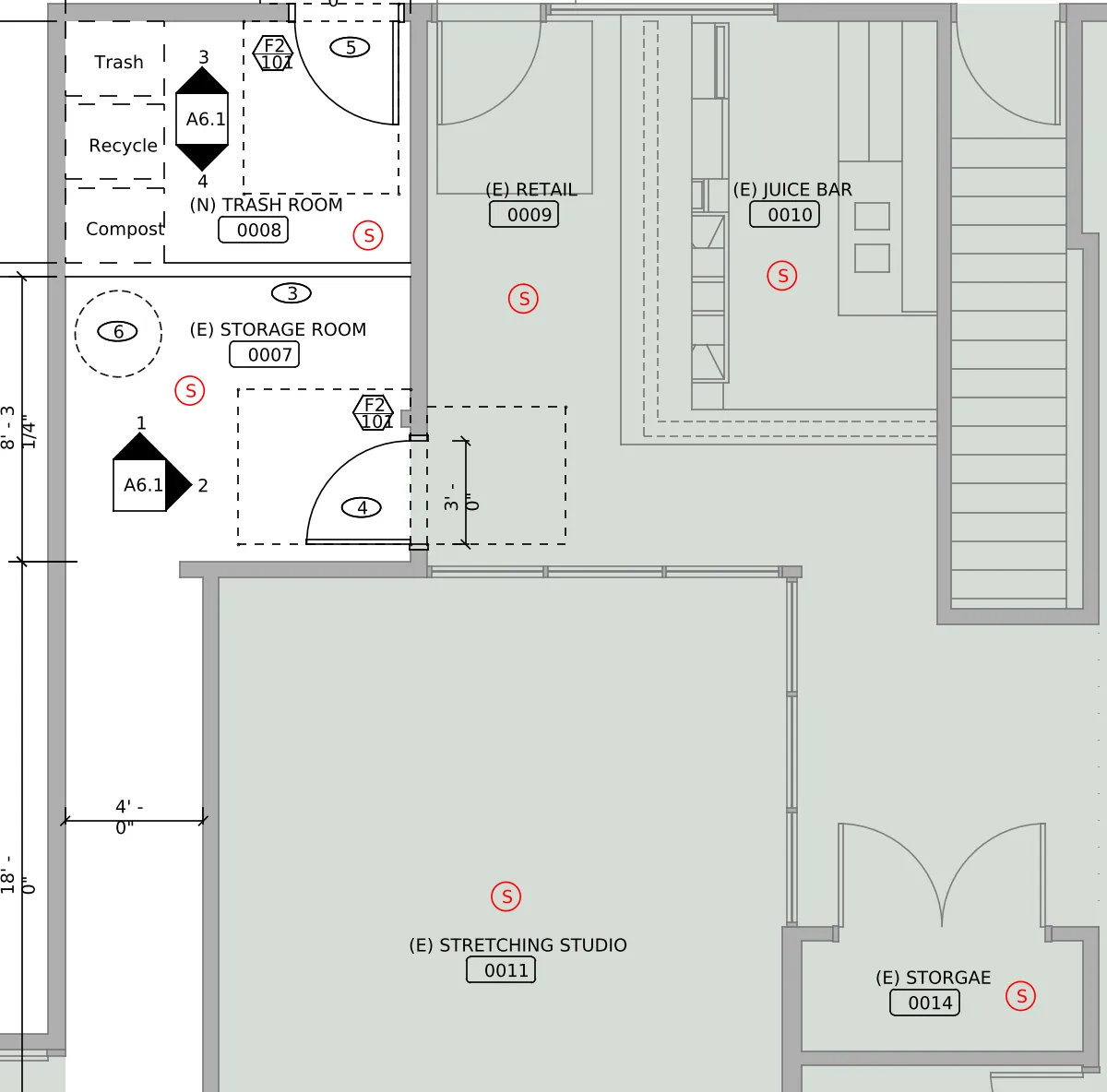
Add a ceiling smoke detector inside each of these rooms: the Trash Room, the Storage Room, Retail, Juice Bar, Stretching Studio, the small storage room with the double doors, Exercise Room, Changing Room and Reception. Each detector must sit inside the walls of its own room, near the middle, never in a doorway, a door swing or the space outside the room's doors. Do not put smoke detectors in either shower room. In the Laundry Room, add a heat detector instead of a smoke detector. Keep every device clear of walls, doors, room tags, dashed lines and other linework, and add a general note below the plan that reads ALL DETECTORS TO BE INTERCONNECTED.
The drawing had no detector symbols of its own, so AutoMEP drew simple lettered circles on a new fire alarm layer. Swap in your office's symbols if you use different ones. Retail and the juice bar share one open space, so confirm each detector sits on the side you count as that room, and check the spacing in the larger rooms against your code before you issue the plan.
 View sheets
What you can do from the chat
The chat covers a request from the drawing to the download. Project settings such as CAD standards and title blocks stay on automep.app, and what AutoMEP can't do is the same in both places.
- Add drawings
- Pick a DWG or RVT in the upload card and it goes straight into your AutoMEP project. The assistant can also list your projects or start a new one.
- Ask for the change in your own words
- The assistant helps you word it, shows you the request and asks before sending anything that uses your plan.
- Answer AutoMEP's questions
- If the request is unclear, AutoMEP asks first, and you answer right there in the chat.
- Hear when it's done
- The request card keeps itself up to date and posts in the chat when the drawing is done.
- Check and download the result
- Look through the sheets in the card, then download the edited DWG or RVT and its PDF, or open it on automep.app.
Connect AutoMEP
You do this once. You'll need AutoMEP's address, then you approve the connection while signed in to automep.app. Claude and ChatGPT never see your AutoMEP password.
https://mcp.automep.app/mcpIn Claude
- In Claude, open Customize, then Connectors.
- Choose + Add, then Add custom connector. Name it AutoMEP, paste the address above and click Continue.
- Pick Sign in now and Register automatically, then click Add.
- Sign in to AutoMEP, read what Claude will be able to do, tick the box and click Allow.
- In a chat, choose +, then Connectors, and turn AutoMEP on.
On Claude Team and Enterprise, an Owner adds AutoMEP for the organization first, under Organization settings and Connectors; then each person connects it under Customize. A Free Claude account can add one custom connector.
In ChatGPT
- In ChatGPT, open Plugins and find AutoMEP.
- Add it, sign in to AutoMEP, read what ChatGPT will be able to do, tick the box and click Allow.
- In a chat, type @ and pick AutoMEP, or choose it from the + menu.
The AutoMEP plugin is waiting to be listed in ChatGPT. Until then, an admin on ChatGPT Business, Enterprise or Edu can add it on the web: Plugins, then +, then Add custom MCP server, with the address above.
Stuck on a step? The help article walks through it, and you can disconnect any time under Connected apps in Settings.
The MCP server, for technical readers
AutoMEP's connector is a remote server on the Model Context Protocol, the open standard Claude and ChatGPT use to connect to apps. You sign in with your AutoMEP account, so there's no key to create or paste.
| Server address | https://mcp.automep.app/mcp |
|---|---|
| Transport | Streamable HTTP |
| Sign-in | OAuth with your AutoMEP account. Clients register themselves, so there's no key or secret to copy |
| Who can connect | Paid AutoMEP plans: Starter, Pro and Team |
| Cards | An upload card and a request card, shown where the client supports interactive apps |
Tools
list_projects, create_project | See your projects, or start one by name |
|---|---|
list_drawings, upload_drawing | See a project's drawings, or open the upload card |
request_change | Send a change request; uses your plan's usage, so the assistant asks first |
get_job, list_jobs | Where a request stands, with its card |
answer_question, cancel_job | Answer AutoMEP's question, or cancel a request that hasn't finished |
get_download | A short-lived link to the original, the edited file, its PDF or a Revit result's DWG export |
get_usage, get_limits | How much of this month's usage is spent, and what AutoMEP can't do |
Common questions
Starter, Pro and Team. A trial or free account can't connect yet; once your plan is paid, connect the same account and everything in it is there in the chat.
No. A request sent from the chat uses the same usage as the same request on automep.app, from the same monthly allowance. Talking with the assistant uses none; only a request sent to AutoMEP does, and the assistant asks before sending one. If a request is retried by mistake, you aren't charged twice.
Not directly. A file attached to the chat itself doesn't reach AutoMEP. Ask the assistant to upload a drawing and pick the DWG or RVT in the upload card it shows; the file goes straight to your AutoMEP project.
The assistant sees what AutoMEP sends back: project and drawing names, a request's status, AutoMEP's notes and its questions, and download links. It never sees your AutoMEP password. AutoMEP receives only what the assistant sends through the connection, never the rest of your conversation.
The Model Context Protocol, the open standard Claude and ChatGPT use to connect to other apps. AutoMEP runs an MCP server at https://mcp.automep.app/mcp; you sign in with your AutoMEP account, so there's no API key to copy.
Open Settings on automep.app and choose Disconnect under Connected apps. Changing your password or email also disconnects every assistant.
Start with a real drawing
Try AutoMEP free on automep.app first. Once your plan is paid, connect Claude or ChatGPT to the same account and keep working from the chat.
Claude and ChatGPT are trademarks of their respective owners. AutoMEP isn't affiliated with or endorsed by them.